 DayPilot
The JavaScript Scheduler supports phones, tablets and other touch devices in the browser. Native touch gestures are enabled by default, with configurable controls and layout options for the same resource timeline used on desktop.
Use native touch gestures
A tap on an event runs its click action. Press-and-hold activates event moving, so users can drag a booking to another time or resource. On the grid, a tap selects a single cell and press-and-hold starts selection across several cells.
In Pro, external tasks can also be dragged onto the timeline by touch. The separate Queue component supports touch reordering and moving work to and from the Scheduler, so tablet users can assign waiting work as well as adjust existing bookings.
The touch documentation describes the gesture settings, including the configurable hold timeout. The same event callbacks connect mouse and touch interactions to the application.
Expose resizing and event actions
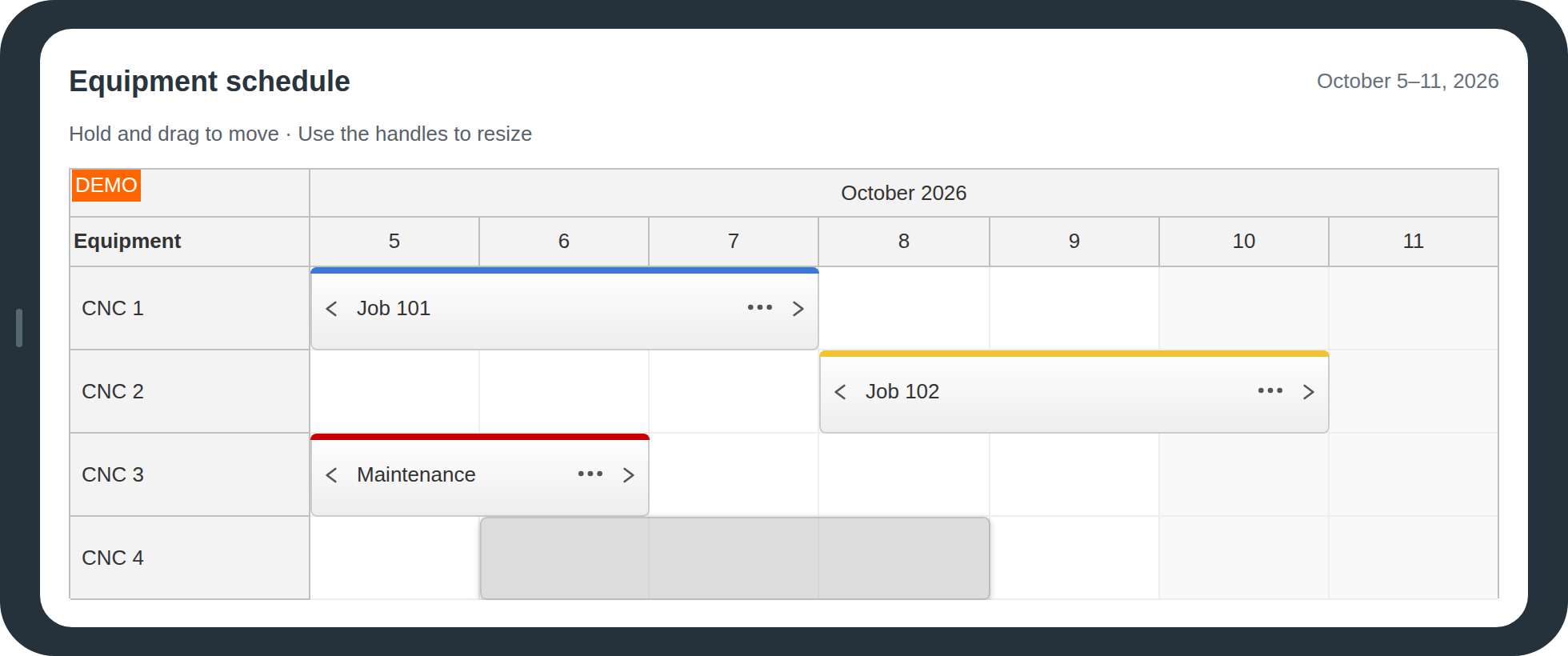
Active areas provide visible resize handles, menu triggers and action buttons inside events. Touch resizing uses an explicit handle. Controls can remain visible on touch while appearing only on hover for mouse users.
This provides access to actions such as Edit, Duplicate and Delete without depending on right-click or hover. The touch Scheduler tutorial demonstrates these controls in a working application.
Keep the timeline usable on smaller screens
The date range, time scale and resource-header width are configurable. Automatic cell width adapts to the available width, with a minimum cell width and horizontal scrolling when the timeline cannot fit.
Automatic scrolling brings additional dates and rows into reach during a drag. A shorter planning window or a coarser scale can provide a more compact overview while the underlying event data stays the same.
Run in standard mobile browsers
The Scheduler runs in responsive web applications on iOS/iPadOS and Android. See the current browser compatibility information for supported environments. It uses the browser component and application controls rather than a separate native mobile UI.