 DayPilot
Release date: November 15, 2026
This release adds nonlinear Calendar timelines for lesson timetables, working-day plans, and bookings that hide nights or weekends. Time cells can have different durations and heights, and grouped vertical headers can show days alongside hours.
It also corrects touch cancellation and delayed actions during component updates or disposal, adds missing Month event-filtering declarations, and fixes Gantt row editors for values stored in task tags.
Features
Nonlinear timelines in the Calendar
The Calendar can now display a vertical timeline with gaps, different cell durations, and independently configured cell heights. Use it for school timetables, appointment sessions, or shift plans where a continuous, evenly spaced time axis would leave too much empty space.
Set scale to "Manual" and supply a timeline array. Each cell defines its start, end, and optional height in pixels. Omitted intervals take no vertical space. For example, a 45-minute lesson and a 60-minute lesson can occupy equally tall rows:
const calendar = new DayPilot.Calendar("dp", {
  startDate: "2028-04-03",
  viewType: "WorkWeek",
  scale: "Manual",
  heightSpec: "Full",
  timeline: [
    {start: "2028-04-03T08:15:00", end: "2028-04-03T09:00:00", height: 72},
    {start: "2028-04-03T09:10:00", end: "2028-04-03T10:10:00", height: 72},
    {start: "2028-04-03T10:30:00", end: "2028-04-03T11:15:00", height: 72}
  ]
});
calendar.init();
In day and week views, the same time pattern repeats on each date. Resource views can use a timeline spanning several days. Selection, moving, resizing, scrolling, and export use the visible timeline geometry.
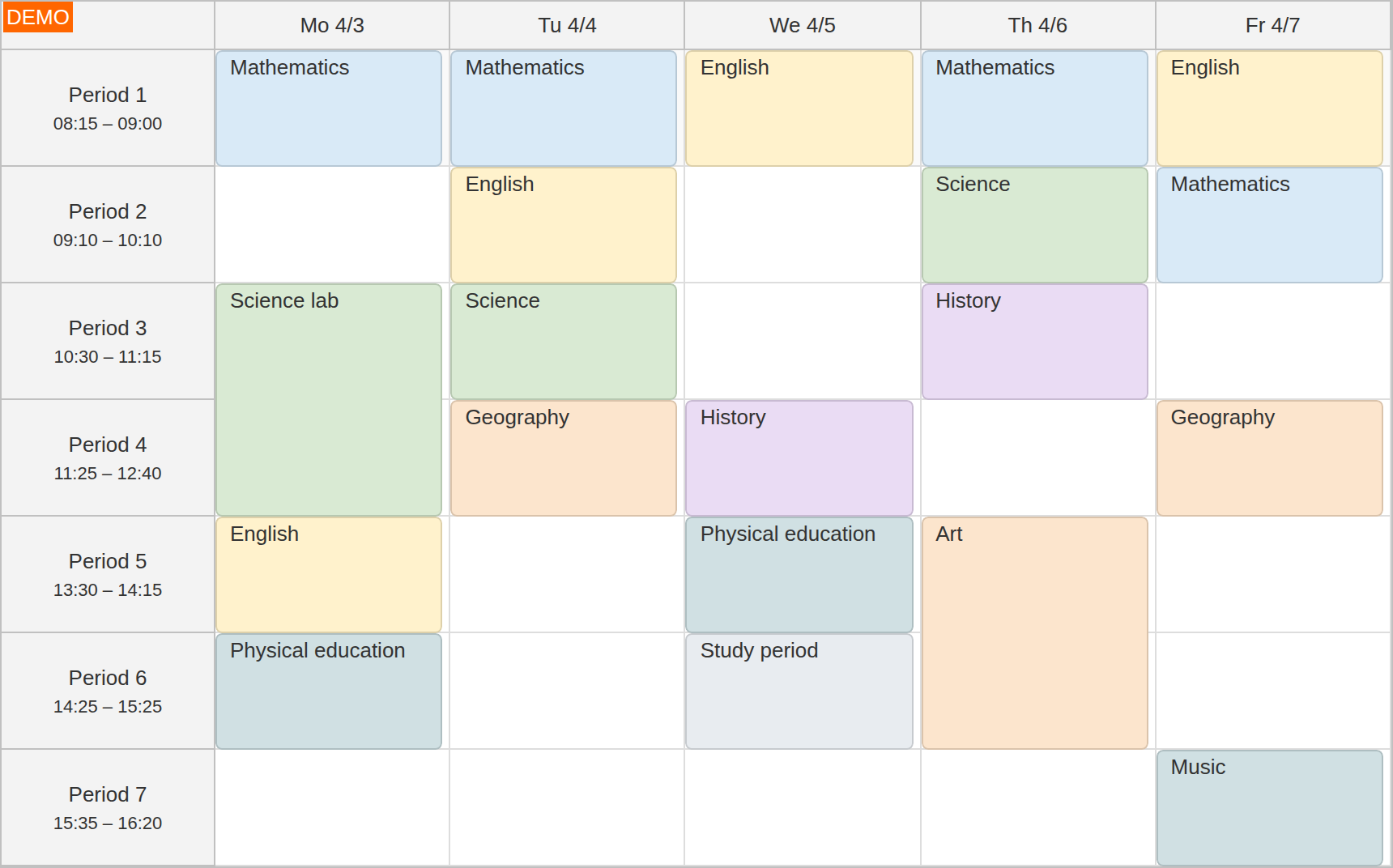
The Timetable demo combines unequal lesson lengths with hidden breaks. Switch between equal row heights and heights proportional to lesson duration. Its moving callback preserves the number of lesson periods when the destination periods have different lengths.
For a generated timeline, use onIncludeTimeCell to hide individual cells or change their dates and height. Explicit manual timelines use the cells supplied in timeline. The new getDate() and getPixels() methods convert between timeline dates and vertical positions; scaleManualLimitBeyond controls whether moved events may extend past a manual timeline's end.
Timeline gaps are marked by break lines. Use onBeforeGridLineRender to change their appearance or hide them, as the timetable does by default:
onBeforeGridLineRender: args => {
  if (args.type === "HorizontalBreak") {
    args.hidden = true;
  }
}
Hide weekends and non-business hours
Calendar resource views can now remove non-business intervals from the vertical axis. A staff plan can show working days without weekend rows, and a room-booking calendar can place one business day directly after the previous one without displaying the intervening night.
Set showNonBusiness to false. With an hourly scale, the Calendar hides hours outside businessBeginsHour and businessEndsHour. Set businessWeekends to false to exclude Saturdays and Sundays:
const calendar = new DayPilot.Calendar("dp", {
  startDate: "2028-04-03",
  viewType: "Resources",
  days: 7,
  scale: "Hour",
  businessBeginsHour: 8,
  businessEndsHour: 18,
  businessWeekends: false,
  showNonBusiness: false,
  eventMoveSkipNonBusiness: true,
  columns: [
    {id: "A", name: "Cedar room"},
    {id: "B", name: "Maple room"}
  ]
});
calendar.init();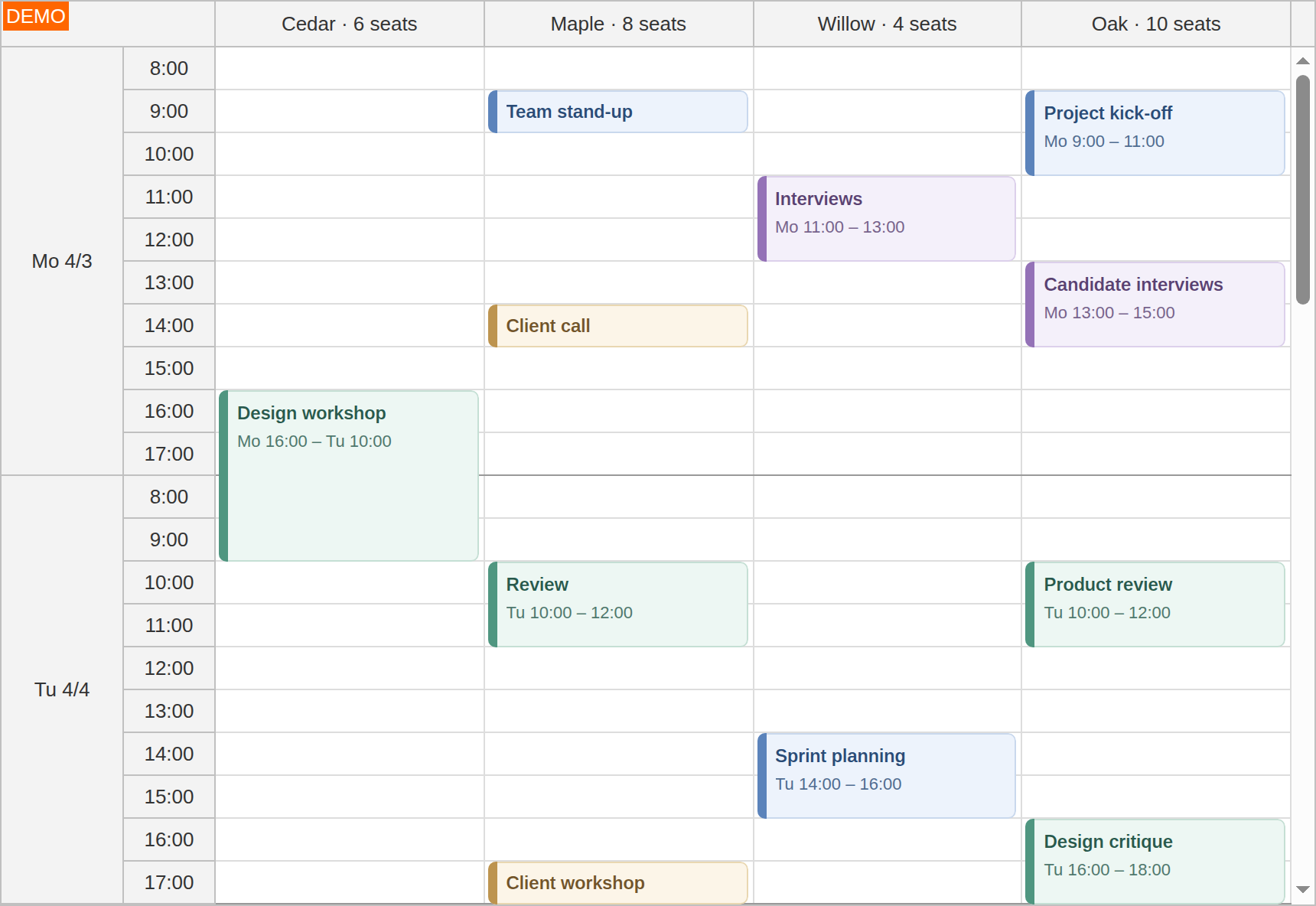
With eventMoveSkipNonBusiness enabled, moving a booking preserves its working-time duration across non-business intervals. Leave it disabled to preserve elapsed duration instead. An individual event can opt out using moveSkipNonBusinessDisabled: true.
Set scale to "Day" for whole-day rows. The showNonBusinessForceHours option additionally applies business-hour limits to day-scale cells. An explicit onIncludeTimeCell handler takes precedence over automatic time filtering, so it can define a custom work calendar.
Try Hiding Weekends and Hiding Non-Business Hours. Both demos let you compare visible and hidden non-business time and switch working-time preservation on or off.
Grouped vertical time headers
The new Calendar timeHeaders configuration adds multiple time-header columns beside the grid. For example, group hours under their day when a resource calendar spans several working days:
timeHeaders: [
  {groupBy: "Day", format: "ddd M/d", width: 80},
  {groupBy: "Hour", format: "H:mm", width: 60}
]
Each level has its own grouping, date format, and width. Set groupBy to "Cell" for headers aligned with individual timetable periods. Grouping follows the visible timeline, including hidden intervals and cells with different heights.
onBeforeTimeHeaderRender now supplies the level, grouping, and interval end in addition to the existing time information. Header callbacks also support text, background and font colors, and horizontal and vertical alignment. This lets an application distinguish day labels from individual hour or lesson labels. See the Grouped Time Headers guide and the working-hours demo.
Fixes
Scheduler
- Fix pending external drags starting after touch release, cancellation or stopDragging(). (2026.4.7148)
- Fix canceled touch gestures leaving dragging or time range selection active. (2026.4.7148)
- Fix touch-and-hold errors, stale row context menus and blocked touch interactions after event or resource updates. (2026.4.7148)
- Fix stale message animation callbacks after dispose() or update(). (2026.4.7149)
Gantt
- Fix canceled task touch gestures and task updates leaving touch interactions active. (2026.4.7148)
- Fix message animation callbacks running after dispose(). (2026.4.7149)
- Fix row editors opening empty for values stored in task tags, which could erase existing values when confirmed without changes. (2026.4.7160)
Calendar
- Fix canceled touch gestures starting event dragging or time range selection. (2026.4.7148)
- Fix delayed event-click errors after disposal or event refresh. (2026.4.7148)
- Fix delayed touch actions running after disposal or event refresh. (2026.4.7148)
- Fix pending external drags starting after cancellation or source removal. (2026.4.7148)
- Fix message animation callbacks running after dispose(). (2026.4.7149)
- Invoke onEventMoving during touch dragging and apply the same move validation as mouse dragging. (2026.4.7150)
- Allow
nullin the timeHeaders TypeScript declaration to restore default time headers. (2026.4.7162) - Correct nullable date typing in time-header callbacks when using default time headers in Day and Week views. (2026.4.7162)
Month
- Fix delayed event-click errors after disposal or event refresh. (2026.4.7148)
- Fix touch-and-hold errors after disposal or event refresh. (2026.4.7148)
- Fix pending external drags starting after cancellation or source removal. (2026.4.7148)
- Fix canceled touch gestures starting event dragging or time range selection. (2026.4.7148)
- Cancel message animations and automatic-hide timers when the Month component is disposed. (2026.4.7149)
- Add missing TypeScript declarations for event filtering: onEventFilter, MonthEventFilterArgs, and events.filter(). (2026.4.7158)
Queue
- Fix pending touch drags starting after an item is removed or the Queue is updated or disposed. (2026.4.7148)
Kanban
- Fix canceled card touch gestures and card updates leaving touch interactions active. (2026.4.7148)
- Fix message animation callbacks running after disposal. (2026.4.7149)
Bubble
- Fix pending bubble display after hide() or disposal. (2026.4.7148)
General
- Fix delayed context menu dismissal closing a newly opened menu. (2026.4.7148)