 DayPilot
Release date: November 1, 2026
This release expands Scheduler dependency links to frozen rows and sticky parent events, adds persistent link selection and keyboard navigation in frozen rows, and supports infinite scrolling in right-to-left layouts.
Image exports include more active-area content across Scheduler, Gantt, Calendar, and Month. The release also adds date-range Excel export for Month and previews that span date rows during event editing and selection in year and timesheet views. Detailed export, interaction, and TypeScript corrections are listed below.
Features
Infinite scrolling in right-to-left schedules
The Scheduler now supports automatic infinite scrolling in right-to-left layouts. Applications can extend the visible timeline as users scroll without calculating the timeline buffer, shift distance, or edge margin themselves.
Set rtl to true and infiniteScrollingEnabled to "Auto" in the Scheduler configuration:
rtl: true,
infiniteScrollingEnabled: "Auto"
Manual infinite-scrolling configuration is also supported in RTL layouts. Use dynamic event loading to supply events for newly visible dates. See the infinite scrolling demo for the available scrolling and navigation settings.
Dependency links with frozen rows and sticky parent events
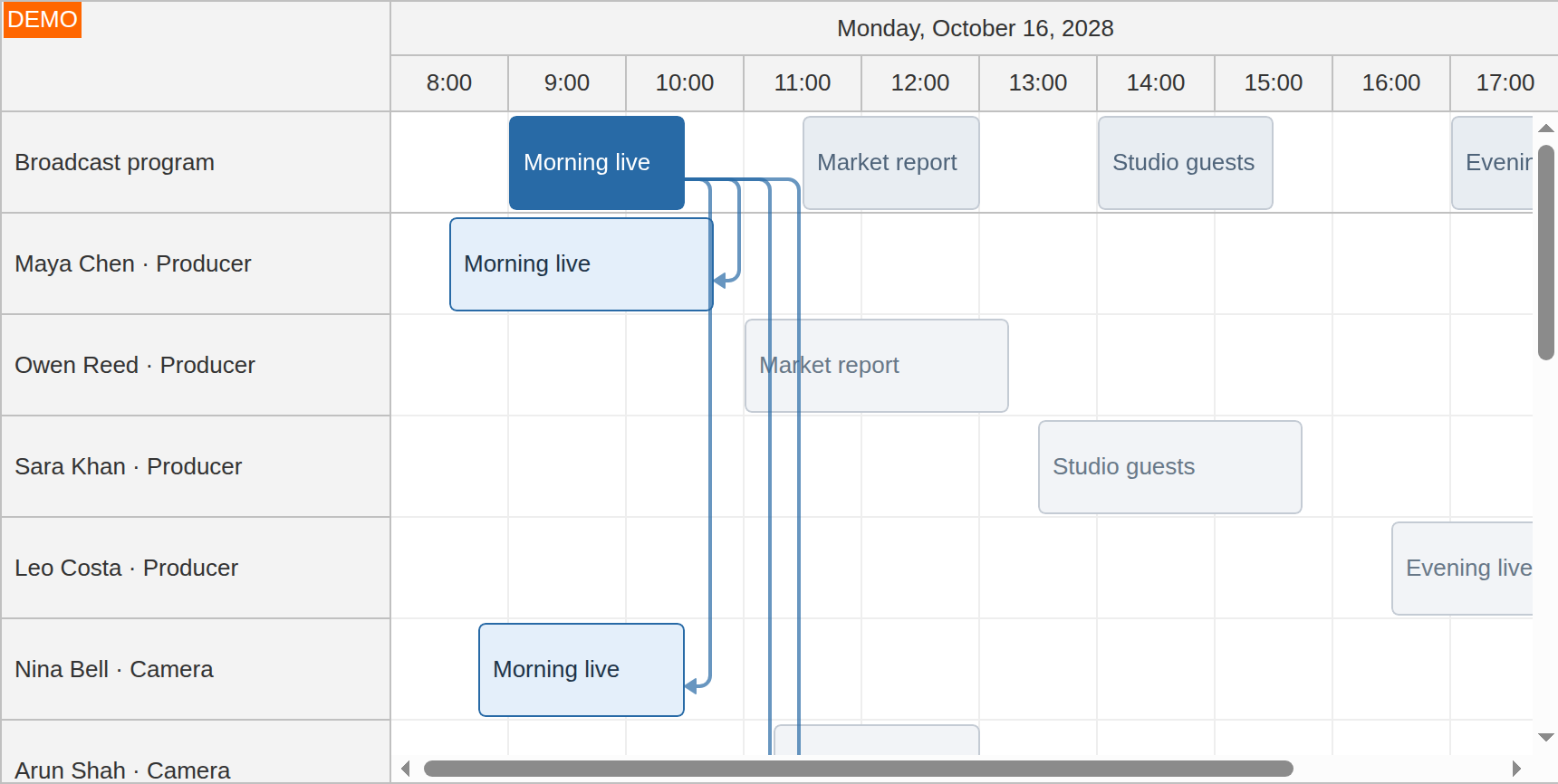
Scheduler dependency links can now connect events in frozen rows with events in the scrolling grid. This is useful when a pinned summary or program needs to stay connected to assignments further down the schedule. Enable these connections using linkCrossGridEnabled: true.
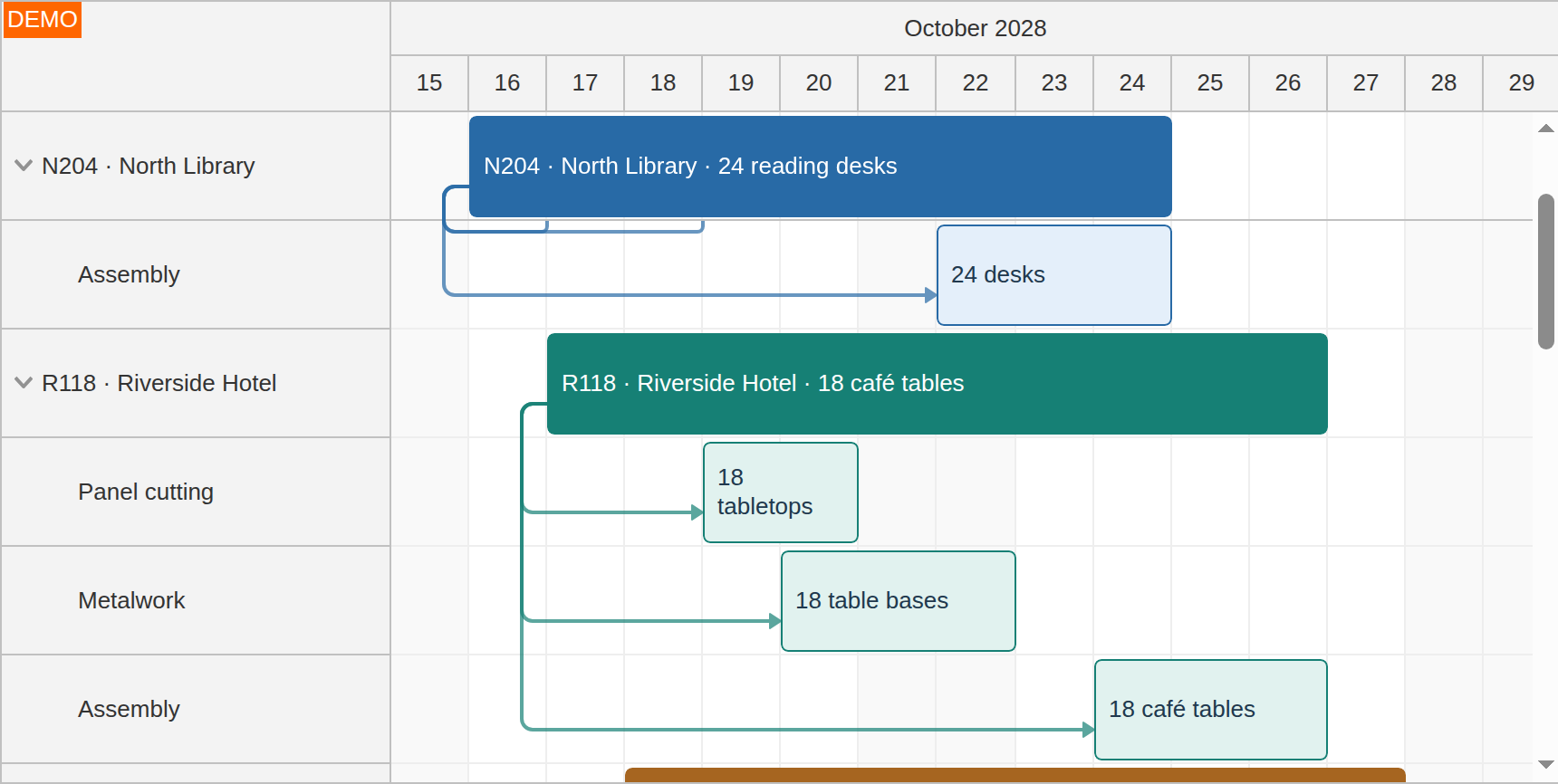
Links can also follow parent events displayed in sticky resource-tree rows. Set linkStickyParentsEnabled: true together with stickyParents to keep the connection attached to the visible parent while scrolling through its child rows.
Both options are disabled by default. Add the relevant setting to your existing Scheduler configuration:
// Connect frozen rows with the scrolling grid.
linkCrossGridEnabled: true,

// Follow parent events in sticky resource-tree rows.
stickyParents: true,
linkStickyParentsEnabled: true
Try the frozen-row links demo and sticky-parent links demo. The scrollDelayCrossGridLinks property controls when connections update during scrolling.
Select dependency links
Scheduler links now support persistent selection. Set linkClickHandling to "Select" so clicking a connection selects it. Ctrl-click or Command-click adds or removes individual links from the selection, allowing an application to inspect or act on several dependencies together.
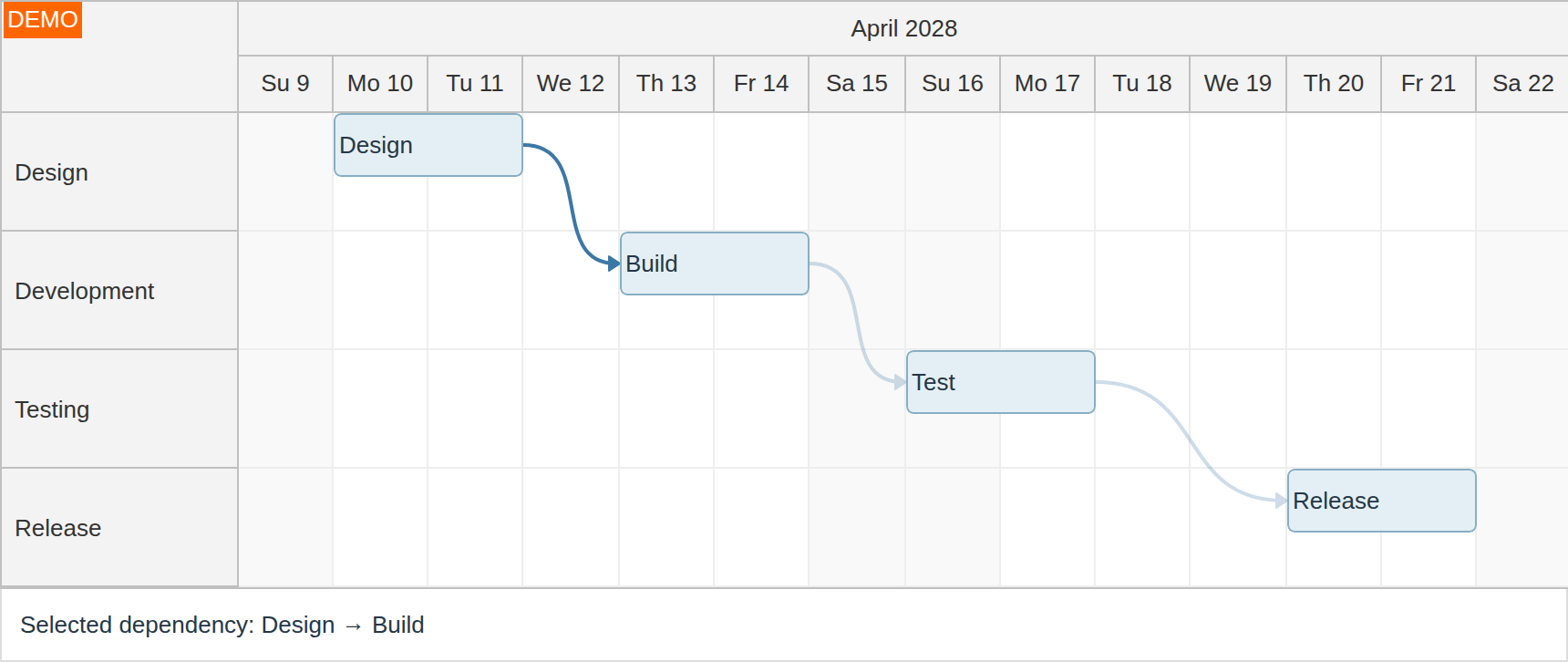
linkClickHandling: "Select",
onLinkSelected: args => {
  console.log(args.selection);
}
Use onLinkSelect to inspect or cancel a proposed change and onLinkSelected to react after it is applied. The links.selection API provides get(), add(), remove(), clear(), and isSelected() methods. Selection is retained when links are redrawn, including connections involving frozen rows and sticky parents.
// Read the current selection from an existing Scheduler.
const selectedLinks = scheduler.links.selection.get();

// Select a link by its ID.
scheduler.links.selection.add("dependency-1");
See the Links API guide for working with link data. The link creation and editing demo shows a separate click-to-edit workflow.
Keyboard navigation in frozen rows
The Scheduler's keyboard navigation now includes rows frozen at the top and bottom. Users can move between frozen and scrolling rows with the arrow keys, activate events, and select time ranges without switching to the mouse.
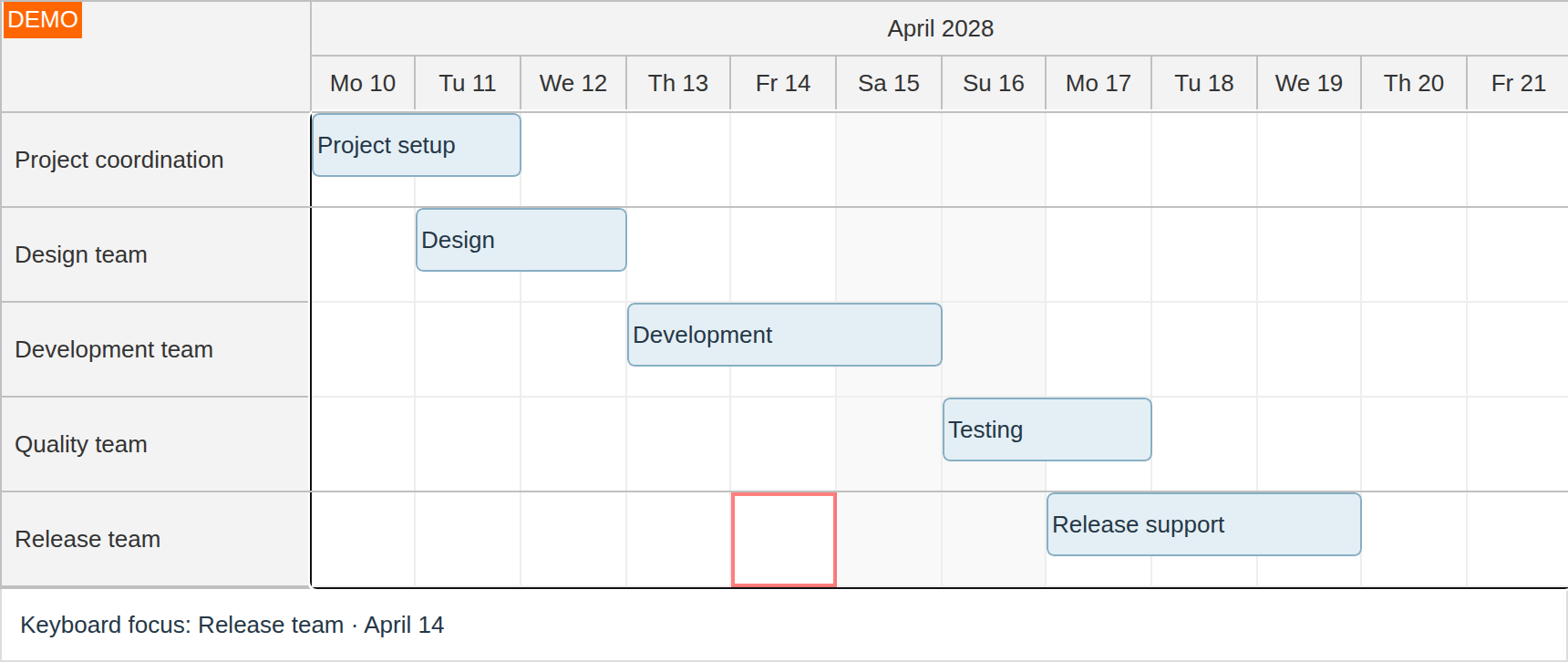
Enable keyboardEnabled and use useEventBoxes set to "Always" in a client-side Scheduler:
keyboardEnabled: true,
useEventBoxes: "Always"
The same arrow-key, Shift+arrow, and Enter commands apply across the row grids. Try the keyboard navigation demo, which includes frozen rows at both edges.
Include more custom content in exported images
Image export now includes active areas in more parts of the scheduling components. Status badges, labels, and other area content can appear in the exported schedule alongside the events.
- Scheduler: active areas in row headers and the upper-left corner.
- Gantt: active areas in row headers, the corner, groups, and milestones.
- Calendar: active areas in cells and column headers.
- Month: active areas in events and date cells.
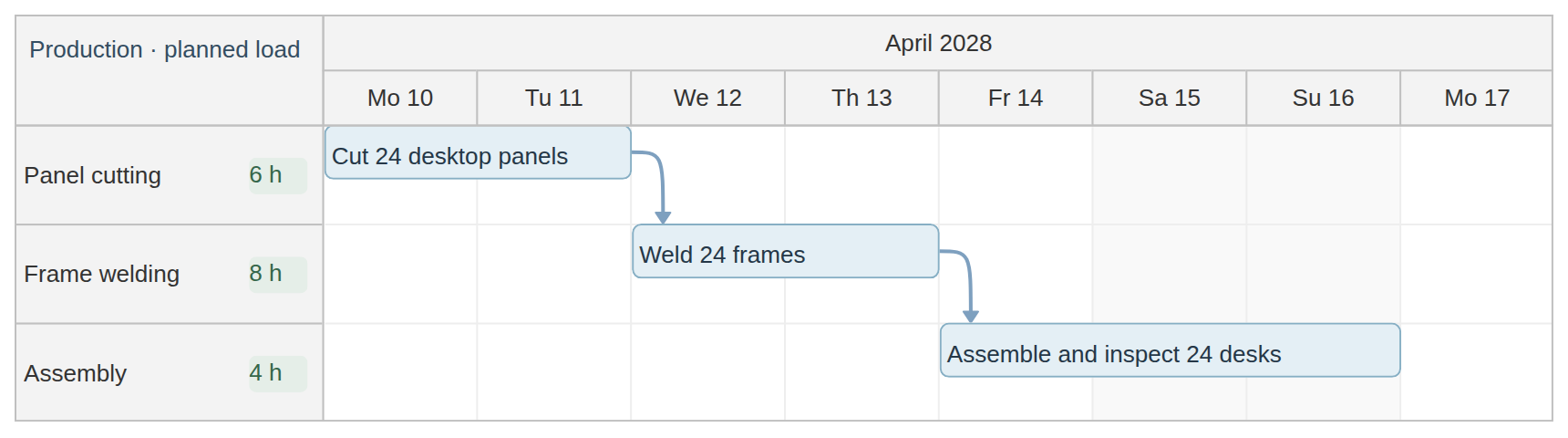
The corresponding export callbacks expose args.areas, allowing you to replace or remove areas specifically for the exported image. Scheduler and Gantt row-header callbacks also expose args.columns[].areas for individual header cells. For example, clear the corner's active areas in onBeforeCornerExport:
onBeforeCornerExport: args => {
  args.areas = [];
}
Use the existing exportAs() API to generate SVG, PNG, or JPEG output. See the image-export guides for Scheduler, Gantt, Calendar, and Month.
Related improvements preserve Scheduler and Gantt dependency-link shapes and styling, including colors, line widths, arrows, opacity, and layers. Image exports also retain uniform pixel corner radii on events and normal Gantt task boxes. Link export covers connections within the same grid; connections between grids and sticky-parent projections remain outside image export. Custom HTML/CSS and asynchronous asset loading retain their existing limitations.
Export a date range from Month to Excel
The Month component can now export a selected date range to Excel. Use exportAs() with area: "range", dateFrom, and dateTo to prepare a workbook containing the relevant weeks:
month.exportAs("xlsx", {
  area: "range",
  dateFrom: "2028-04-10",
  dateTo: "2028-04-24"
}).download("schedule.xlsx");
The range end is exclusive. Export includes complete displayed weeks that intersect the range, following the Month's week-start and hidden-weekend settings. It uses weeks already displayed by the component. The existing ExcelJS setup is required.
Edit and select intervals across date rows
In the Scheduler's year view and timesheet view, moving, resizing, and time-range selection now follow the interval across matching date rows. For example, a selection from late April into early May displays a preview in both month rows and uses the dates of the row under the pointer.
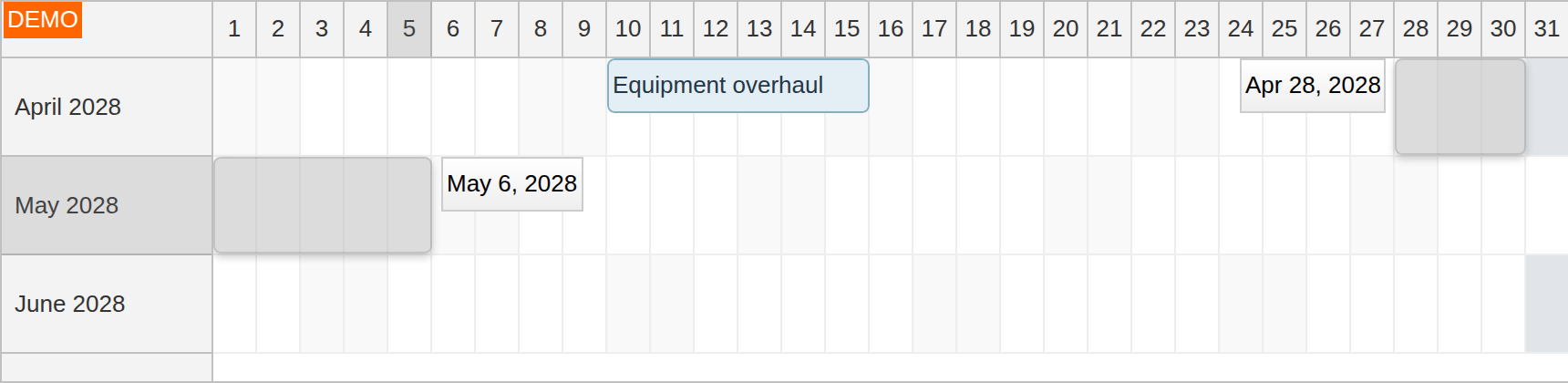
The same behavior applies when moving or resizing an event across a month or day boundary. Validation covers the full interval, date labels show the proposed bounds, and moving dependency previews follow the event. The timesheet layout uses viewType: "Days"; the year layout uses resource rows with their own date ranges.
This behavior applies automatically to these layouts. Existing event-moving, event-resizing, and time-range selection callbacks remain the integration points for application logic. Try the year view demo and timesheet demo.
Improvements
Scheduler
- Complete Quarter scale support, including automatic infinite scrolling and TypeScript declarations. (2026.4.7121)
- Update bundled themes to support link hover styling across frozen and sticky layers. (2026.4.7122)
- Smooth curved backward returns and Start-to-Start/Finish-to-Finish link paths. (2026.4.7122)
- Use consistent top/bottom face entries for near-aligned curved Finish-to-Start and Start-to-Finish links. (2026.4.7122)
- Reduce repeated SVG arrow measurements during link rendering. (2026.4.7122)
- Add the control, original mouse event, and keyboard modifiers to link click callbacks. (2026.4.7122)
- Update the dependency-link demos and add examples for link types, link creation and editing, frozen rows, and sticky parents. (2026.4.7122)
- Add
scrollDelayCrossGridLinksto control cross-grid link update timing. (2026.4.7122) - Image export now preserves dependency link shapes, colors, line widths and styles, arrow sizes, opacity and layers. (2026.4.7130)
- SVG, PNG and JPEG export now preserve uniform event corner radii in pixels, including event versions and clipped exports. (2026.4.7133)
Gantt
- Image export now preserves dependency link shapes, colors, line widths and styles, arrow sizes, opacity and layers. (2026.4.7130)
- SVG, PNG and JPEG export now preserve uniform pixel corner radii for normal task boxes. (2026.4.7133)
Calendar
- SVG, PNG and JPEG export now preserve uniform event corner radii in pixels and clip event contents to the rounded shape. (2026.4.7133)
Month
- SVG, PNG and JPEG export now preserve uniform event corner radii in pixels and clip event contents to the rounded shape. (2026.4.7133)
General
- Add the Modal ariaLabel option to set a custom accessible dialog name. (2026.4.7116)
- Add structured
BITMAP_EXPORT_FAILEDerrors with image dimensions, format, failure stage and original browser error, plus theDayPilot.ExportErrorTypeScript interface. (2026.4.7137)
Fixes
Scheduler
- Fix selectTimeRange() and multirange.add() throwing an exception before any pointer or keyboard interaction. (2026.4.7112)
- Add missing TypeScript declarations for the
hidden,nonresizable,toolTipandbubbleHtmlrow header column properties. (2026.4.7113) - Add missing TypeScript declarations for
args.asyncandargs.loaded()in onEventDelete. (2026.4.7113) - Add the missing TypeScript declaration for rows.sortParam, including its nullable sort field. (2026.4.7113)
- Add the missing TypeScript declaration for
args.formatin onBeforeCornerExport. (2026.4.7113) - Add the missing TypeScript declaration for
args.changein onEventSelected. (2026.4.7113) - Make the success and error callbacks optional in the TypeScript declaration of rows.load(). (2026.4.7113)
- Include
args.controlandargs.viewportin onScrollEnd when dynamic loading is disabled. (2026.4.7114) - Fix zoom.setActive() throwing when selecting a zoom level by ID. (2026.4.7114)
- Fix stale sibling event positions and row heights after optimized event updates and inline editing. (2026.4.7115)
- Run event cache cleanup after synchronous rendering while preserving visible and preloaded events. (2026.4.7115)
- Fix viewport image export after horizontal scrolling in RTL mode. (2026.4.7117)
- Preserve keyboard focus on corner controls after redraws. (2026.4.7119)
- Fix frozen-row alignment after RTL timeline shifts that leave the scroll position unchanged. (2026.4.7121)
- Fix timeline shifts and animated navigation with RTL infinite scrolling. (2026.4.7121)
- Preserve time range selection dates when infinite scrolling shifts the timeline. (2026.4.7121)
- Fix event moving and automatic event boxes with Quarter scale. (2026.4.7121)
- Prevent self-crossings and doubled-back segments in right-angled Start-to-Finish returns. (2026.4.7122)
- Calculate right-angled link attachments from each event's actual height. (2026.4.7122)
- Keep link creation and event-movement previews consistent with the final link paths. (2026.4.7122)
- Complete TypeScript declarations for existing link accessors and cancelable link click callbacks. (2026.4.7122)
- Keep link arrow tips on the actual target boundary for narrow events. (2026.4.7122)
- Route curved backward Finish-to-Start links around both connected events when they share a row. (2026.4.7122)
- Place touching-event link dots at the midpoint of the common border, including events with different heights. (2026.4.7122)
- Preserve the event lane when keyboard navigation passes through empty cells. (2026.4.7124)
- Fix vertical keyboard navigation skipping empty cells between overlapping event lanes. (2026.4.7124)
- Preserve the navigation column when entering events from the right and after redraws or event updates. (2026.4.7124)
- Respect disabled cells and time range validation during keyboard selection. (2026.4.7124)
- Keep keyboard-focused cells fully visible and preserve vertical scrolling when focusing frozen rows. (2026.4.7124)
- Prevent keyboard navigation errors when no navigable resource rows are available. (2026.4.7124)
- Preserve native keyboard behavior in embedded form controls and links. (2026.4.7124)
- Correct
args.ctrlin onGridMouseDown to reflect the Ctrl key state. (2026.4.7125) - Normalize missing onGridMouseDown time bounds to
nulland correct its TypeScript arguments. (2026.4.7126) - TypeScript: Add the supported
"Auto"layout value. (2026.4.7126) - TypeScript: Add
areasandformatto time-header export arguments. (2026.4.7126) - TypeScript: Add
fontStyleandformatto event-export arguments. (2026.4.7126) - TypeScript: Add the edited column index to onRowEdited arguments. (2026.4.7126)
- TypeScript: Add
multirangeto onTimeRangeSelecting arguments. (2026.4.7126) - TypeScript: Add
formatandminHeightto row-header export arguments. (2026.4.7126) - TypeScript: Add viewport corner cells and correct empty-timeline and empty-resource types. (2026.4.7126)
- TypeScript: Correct
widthto accept CSS strings only. (2026.4.7126) - TypeScript: Add read-only row
heightandlinesproperties. (2026.4.7126) - Image export now includes event-version progress bars when durationBarMode is set to
"PercentComplete". (2026.4.7127) - Image export now correctly calculates event and cell active-area widths when positioned using start and end dates. (2026.4.7127)
- Group image export now honors text and background overrides in onBeforeEventExport. (2026.4.7127)
- Image export now includes dependency dots at coincident endpoints. (2026.4.7130)
- Image export now positions dependencies within frozen rows correctly. (2026.4.7130)
- Image export now uses the resource row height when positioning cell active areas. (2026.4.7132)
- Image export now resolves CSS dimensions of event, cell and time header active areas, including percentages and
calc()expressions. (2026.4.7132) - SVG, PNG and JPEG exports now respect event text set in onBeforeEventRender. (2026.4.7138)
- Correct active area placement in RTL image exports. (2026.4.7139)
- Excel export: Fix an error when all row header columns are hidden. (2026.4.7141)
- Excel export: Clip events and supported active areas to the selected date range or viewport. (2026.4.7141)
- Prevent an error when a Scheduler is disposed while one of its events is being dragged outside the control. (2026.4.7142)
- Event moving now checks continuation rows for overlaps when allowEventOverlap is set to
false. (2026.4.7142) - Fix errors and incorrect time range selections when rapidly tapping between Scheduler instances on touch devices. (2026.4.7143)
Gantt
- TypeScript: Correct cell types for rendering, export and coordinates, preserving customization through properties and omitting the Scheduler-only resource field. (2026.4.7126)
- TypeScript: Add getCoords() with task coordinates and a nullable result. (2026.4.7126)
- TypeScript: Add active
areasand font styling to cell-export arguments. (2026.4.7126) - TypeScript: Use named task render, box and row data types, with a required render box and optional input box. (2026.4.7126)
- TypeScript: Add
textandfontStyleto task-export arguments. (2026.4.7126) - TypeScript: Correct the task and control types in onRowCollapse and onRowExpand arguments. (2026.4.7126)
- Group image export now honors text and background overrides in onBeforeTaskExport. (2026.4.7127)
- TypeScript: Add
linkCreateDisabledtoTaskBoxData. (2026.4.7131) - Include external in onTaskMove and onTaskMoved arguments. (2026.4.7131)
- Image export now resolves CSS dimensions of active areas, including percentages and
calc()expressions. (2026.4.7132) - Excel export: Clip tasks to the selected export date range. (2026.4.7141)
Calendar
- Fix horizontal scrollbar range, header/grid alignment and corner positioning after resizing fixed-width resource columns. (2026.4.7111)
- Render newly visible cells and events when shrinking resource columns. (2026.4.7111)
- Fix header, cell and event-column alignment during resizing in right-to-left layouts. (2026.4.7111)
- Prevent column resizing jumps when shrinking columns at the horizontal scroll limit. (2026.4.7111)
- Fix initialization and updates when hour or column headers are hidden. (2026.4.7120)
- Fix image and Excel export when hour or column headers are hidden. (2026.4.7120)
- Fix changing hour column visibility using update(). (2026.4.7120)
- Ignore queued width-observer callbacks after disposal, including when a replacement Calendar uses the same element. (2026.4.7122)
- Fix missing startAutoRefresh() and stopAutoRefresh() methods. (2026.4.7125)
- TypeScript: Correct onTimeRangeSelecting indicator names to
topandbottom. (2026.4.7126) - TypeScript: Add the tapAndHoldTimeout property. (2026.4.7126)
- TypeScript: Add active
areasto event-export arguments. (2026.4.7126) - TypeScript: Add Shift key state to onEventClick and onEventClicked arguments. (2026.4.7126)
- TypeScript: Add
anchorto onEventResizing arguments. (2026.4.7126) - Image export now correctly positions fixed-size active areas anchored to the right or bottom in timed and all-day events. (2026.4.7127)
- Image export now resolves CSS dimensions of event active areas, including percentages and
calc()expressions. (2026.4.7132) - Fix an error when activating a zoom level by ID using zoom.setActive(). (2026.4.7134)
- SVG, PNG and JPEG exports now respect event text set in onBeforeEventRender, including timed and all-day events. (2026.4.7138)
- Excel export: Preserve column and hour-header widths when showHeader is set to
false. (2026.4.7141) - Excel export: Respect event text customized using onBeforeEventRender for timed and all-day events. (2026.4.7141)
Month
- TypeScript: Add the selection change to onEventSelected arguments. (2026.4.7126)
- TypeScript: Add Meta key state to onEventMove and onEventMoved arguments. (2026.4.7126)
- Image export now respects RTL layout for headers, date cells and events. (2026.4.7128)
- Image export now includes event start and end times, including custom start and end labels. (2026.4.7136)
- Fix event placement, dragging, resizing and date selection in right-to-left layouts. (2026.4.7136)
- Fix date selection across hidden weekends. (2026.4.7136)
- SVG, PNG and JPEG exports now respect event text set in onBeforeEventRender. (2026.4.7138)
- Excel export: Respect weekday-header text and background colors customized using onBeforeHeaderRender. (2026.4.7141)
- Excel export: Preserve day-header text customized using onBeforeCellRender. (2026.4.7141)
- Fix the TypeScript declaration of
exportAs()to support XLSX export. (2026.4.7145)
Navigator
- TypeScript: Add onBeforeCellDomAdd and onBeforeCellDomRemove callbacks with named cell types. (2026.4.7126)
Queue
- Fix eventRightClickHandling so
"Enabled"fires callbacks without opening a context menu. (2026.4.7125) - TypeScript: Add the eventBorderRadius property. (2026.4.7126)
- TypeScript: Add supported item styling fields to
QueueData. (2026.4.7126) - TypeScript: Add the tapAndHoldTimeout property. (2026.4.7126)
Kanban
- TypeScript: Add
asyncandloaded()to onCardMove arguments. (2026.4.7126)
Bubble
- TypeScript: Add the supported
"Right"position value. (2026.4.7126)
General
- Add the missing TypeScript declaration for the active-area
onAfterRendercallback and itsargs.divparameter. (2026.4.7113) - Preserve edited Modal text field values when dependent fields are disabled and re-enabled. (2026.4.7114)
- Expose Modal popups as named dialogs with modal semantics. (2026.4.7116)
- Keep keyboard focus inside active Modal dialogs and restore background interaction on close. (2026.4.7116)
- Fix DatePicker initialization when component scripts are minified separately. (2026.4.7117)
- Prevent errors and stale iframe content when a
DayPilot.Modaldialog is closed or reopened before HTML insertion completes. (2026.4.7125) - TypeScript: Add the writable string
colorargument to Scheduler and Gantt grid-line rendering callbacks. (2026.4.7126) - TypeScript: Add
externalrow-move state andkeepSource()to Scheduler and Gantt callbacks. (2026.4.7126) - TypeScript: Allow a result in static Modal.close() and type the optional instance returned by Modal.opener(). (2026.4.7126)
- TypeScript: Make success and error callbacks optional in collection loaders. (2026.4.7126)
- TypeScript: Correct
EventData.recurrentMasterIdto accept string and numeric event IDs. (2026.4.7126) - TypeScript: Correct nullable return types for lookups, selections, coordinates, task business calculations and date parsing. (2026.4.7126)
- SVG export now preserves explicit line breaks when text wrapping is disabled. (2026.4.7127)
- SVG export now preserves italic and combined bold/italic styles and measures bold text correctly. (2026.4.7127)
- PNG and JPEG export now respects the configured dimensions of embedded images. (2026.4.7127)
- SVG export now preserves individual SVG symbol colors. (2026.4.7127)
- SVG export no longer inserts an empty line before an oversized word. (2026.4.7127)
- SVG export now preserves drawing order and keeps asynchronously loaded images and symbols in their original groups and positions. (2026.4.7128)
- Calendar and Month image export now aligns event text to the right by default in RTL layouts. (2026.4.7128)
- PNG and JPEG export now respects explicit left, center and right text alignment in RTL layouts. (2026.4.7128)
- SVG export now uses the correct image/svg+xml MIME type for data URIs and Blob objects. (2026.4.7129)
- Prevent empty PNG/JPEG images and zero-byte downloads when bitmap allocation or encoding fails. (2026.4.7137)
- Reject saving or printing partially rendered bitmap exports after drawing or opacity-buffer failures. (2026.4.7137)
- Image export now follows the active area content precedence used by live rendering, including explicit empty text and HTML. (2026.4.7139)
- Image export now preserves active area borders, including selected sides in RTL layouts. (2026.4.7139)
- Scheduler and Gantt image export now honor active area
offsetX. (2026.4.7139) - Image export now supports numeric uniform active area
borderRadiusvalues, including rounded borders and content clipping. (2026.4.7139) - Scheduler and Gantt image export now preserve active area anchors when cropping and clip areas to their owner and viewport bounds. (2026.4.7139)
- Image export now honors the active area
backgroundalias. (2026.4.7139) - Excel export: Empty event labels no longer retain underlying grid-cell text in Calendar and Scheduler. (2026.4.7141)
- Excel export: Restore
toBlobAsync()on the result ofexportAs("xlsx")for Calendar, Month, Scheduler and Gantt. (2026.4.7141)
API Changes
Scheduler
- Dependency links now use 70% opacity by default. Hovered and selected links use 100% opacity; other visible links are dimmed to 25% while a link is hovered or selected. Existing hover CSS classes remain supported. Review custom link themes when upgrading. (2026.4.7122)