 DayPilot
Release date: October 8, 2026
Performance optimizations
Faster loading of large Scheduler datasets
Opening a large booking or production plan now takes less time when resources have many events that do not overlap. The Scheduler applies the event-loading optimization automatically, so existing applications benefit without a new setting.
Use the React Scheduler performance sample to run benchmarks with 10,000, 50,000, or 100,000 events. Compare the loading diagnostics, then test scrolling, editing, moving, and resizing. Test with your own event distribution and content as well; event count alone does not determine performance.
Long timelines at an hourly scale
Plan across months or years while keeping an hourly view. The Scheduler and Gantt chart now render time headers progressively, reducing the work needed to open a long timeline. This is enabled by default.
Try the progressive time headers demo with a one-year hourly timeline (8,760 time cells) or ten years (87,648 time cells). Compare progressive rendering on and off, choose plain, rich, or interactive headers, and jump to the start, middle, or end. The initialization-time readout lets you compare configurations in your browser.
Faster row-header sizing and smoother scrolling
Automatic row-header sizing is faster, especially with many resources or several row-header columns. Use it to fit resource names and other header content without assigning every column a fixed width.
The release also improves Scheduler scrolling with floating event labels. Long bookings keep their labels visible as you scroll, including custom React, Vue, and DOM content, while preserving the content's state.
Features
Long timelines with progressive rendering of time headers
The Scheduler and Gantt chart now render time headers progressively during scrolling. This reduces the initial rendering work and the number of header elements on the page. Progressive rendering is enabled by default.
See the progressive time headers demo to test the performance. It displays up to ten years at an hourly scale (87,000+ time cells).
This new implemenation allows using a long fixed timeline instead of shifting the timeline automatically using infinite scrolling without a performance hit.
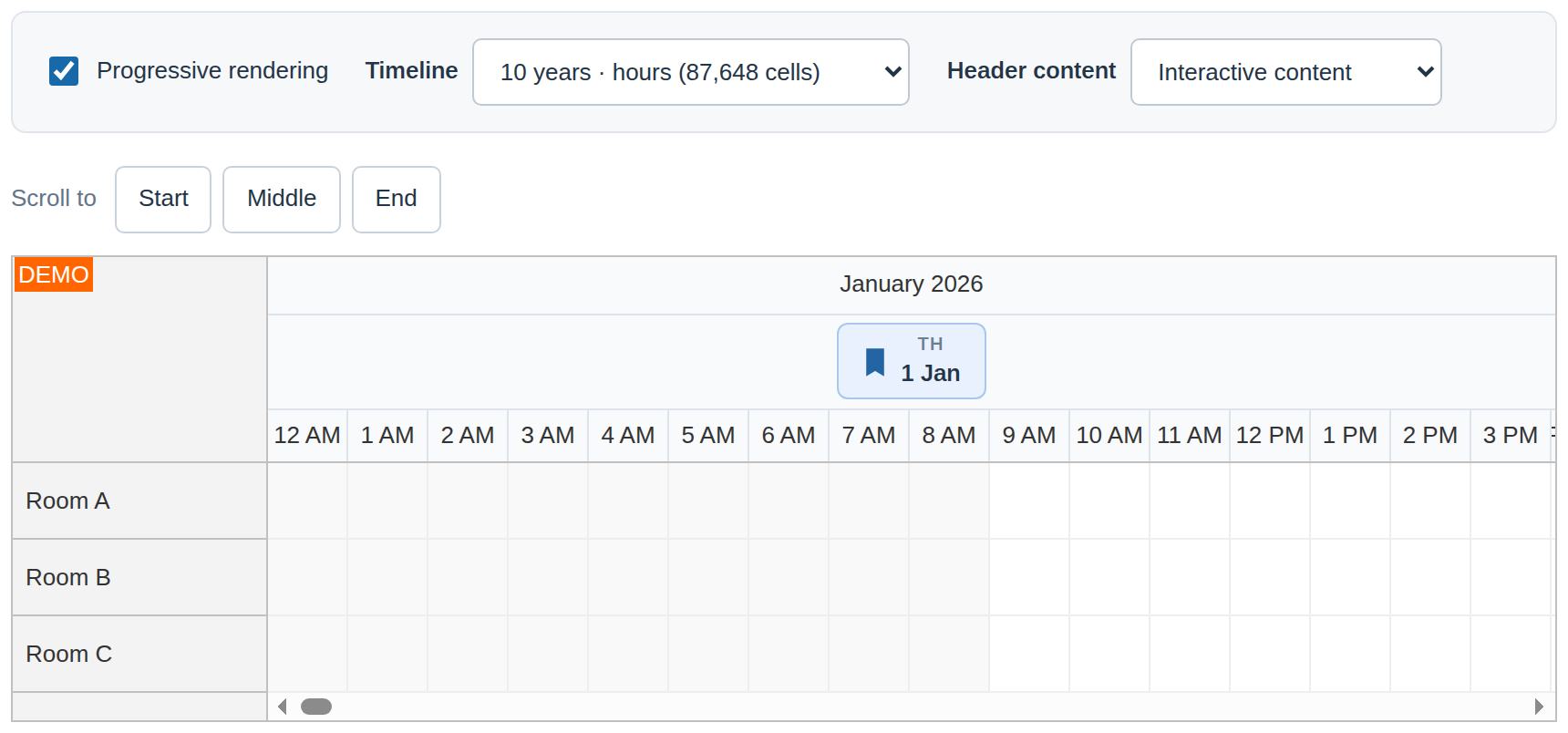
See the Scheduler guide and Gantt guide for configuration. The timing of onBeforeTimeHeaderRender changes: it runs when a header is needed for display or export. Applications that require eager callbacks can set progressiveTimeHeaderRendering to false.
Automatic configuration for infinite scrolling
The new "Auto" value of infiniteScrollingEnabled now sets the infinite scrolling configuration automatically, based on the viewport (timeline buffer, shift distance and edge margin for the current viewport and time scale). It also adapts when the layout or scale changes.
The infinite scrolling mode needs to be used with dynamic event loading to load the required dates and resources. The infinite scrolling guide explains supported configurations, and the interactive demo lets you compare modes and navigation settings.
Smoother resource-tree animation
Expanding and collapsing resource groups now uses a new animation implementation with configurable duration and easing. Automatic duration adjusts to the height of the group.
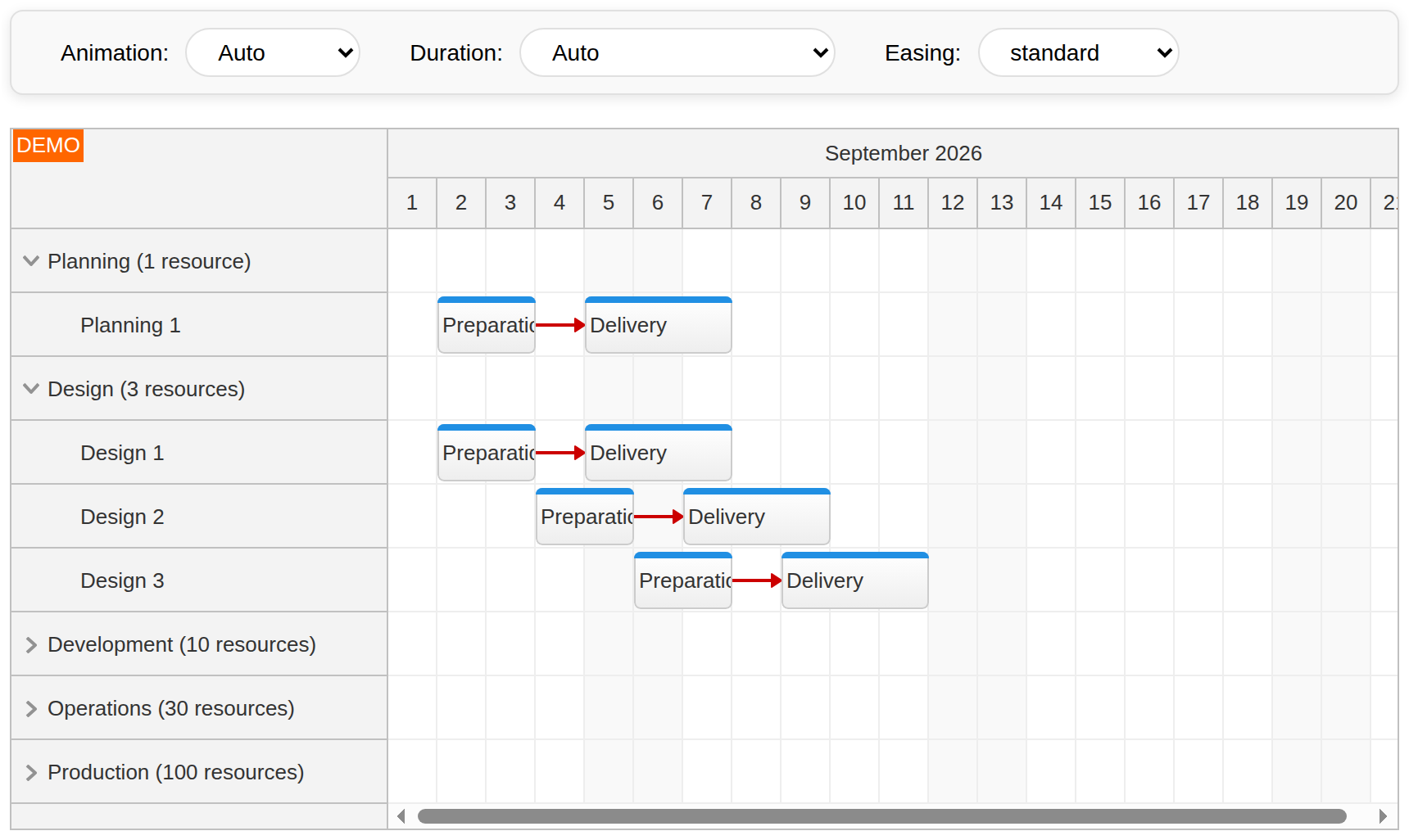
Animation remains enabled by default. Set treeAnimation to "Auto" to respect the system’s reduced-motion preference. Use treeAnimationDuration and treeAnimationEasing to adjust the transition. Try the resource tree animation demo or read the resource tree guide.
Custom content in floating event labels
Floating event labels keep event content visible as you scroll horizontally. Now they automatically display custom React components, Vue templates and custom DOM elements that you use to define the event content.
The label also follows the event padding, vertical alignment and font color.
Improvements
Scheduler
Infinite-scrolling demo: Updated with a configuration toolbar, API links, and scroll actions below the Scheduler. (2026.4.7072)
DayPilot.Scheduler.infiniteScrollingEnabled:
"Auto"value supported. (2026.4.7072)Add treeAnimationDuration, accepting milliseconds or
"Auto"(default). Automatic duration adjusts to content height within 240–550 ms. (2026.4.7077)Resource tree animation demo: Test live animation, duration, and easing controls and resource groups of different sizes. (2026.4.7077)
Add treeAnimationEasing, supporting
"standard"(default), CSS easing keywords, and customcubic-bezier()values. (2026.4.7077)Add
"Auto"to treeAnimation to respect the system reduced-motion preference. The default remainstrue. (2026.4.7077)Optimization of Scheduler event loading: Automatic fast placement for rows with many non-overlapping events, speeding up loading of large datasets. (2026.4.7078)
Optimization of Scheduler row header width auto-fit: Improved rendering performance of row header auto-fit (especially for a large number of rows and row header columns). (2026.4.7079)
Add progressiveTimeHeaderRendering, progressiveTimeHeaderRenderingMargin, progressiveTimeHeaderRenderingCacheSize and scrollDelayTimeHeaders configuration properties. (2026.4.7080)
Speed up time-header lookup and floating-label updates. (2026.4.7080)
Optimization of long Scheduler timelines: Reduce timeline initialization overhead by avoiding redundant date-to-string conversions and hourly boundary calculations. (2026.4.7080)
Keep date labels visible while React time-header components mount during scrolling. (2026.4.7080)
Progressive Time Headers demo: Timeline presets up to ten years, plain/rich/interactive header content, animated navigation and an initialization-time readout. (2026.4.7080)
Speed up cached time-to-pixel lookups using numeric cache keys. (2026.4.7080)
Add read-only args.invalid to onEventMoving to report an invalid move for the primary event or any event in a multi-move operation. (2026.4.7083)
Optimization of Scheduler scrolling: Reuse floating event content and limit floating labels to visible rows, preserving content state during scrolling. (2026.4.7086)
Gantt
Add treeAnimationEasing, supporting
"standard"(default), CSS easing keywords, and customcubic-bezier()values. (2026.4.7077)Add
"Auto"to treeAnimation to respect the system’s reduced-motion preference. The default remainstrue. (2026.4.7077)Add treeAnimationDuration, accepting milliseconds or
"Auto"(default). Automatic duration adjusts to content height within 240–550 ms. (2026.4.7077)Add progressiveTimeHeaderRendering, progressiveTimeHeaderRenderingMargin, progressiveTimeHeaderRenderingCacheSize and scrollDelayTimeHeaders. Progressive rendering invokes onBeforeTimeHeaderRender on demand; set progressiveTimeHeaderRendering to
falsefor eager behavior. (2026.4.7080)
General
Optimization of large grids: Reduce DayPilot.Date allocation overhead and accelerate timestamp access across all components. (2026.4.7080)
Improve HTML escaping performance by avoiding DOM allocation for strings that need no escaping. (2026.4.7080)
Fixes
Scheduler
Fixed update() throwing an error when called without options after scrollTo() (Angular). (2026.4.7069)
Fixed an error when dispose() is called while row-header scroll synchronization is pending (core). (2026.4.7070)
Fixed errors when dispose() is called while deferred setScrollX() or setScrollY() requests are pending (Angular). (2026.4.7070)
Fixed an error when dispose() is called while a scrollToResource() request is pending (core). (2026.4.7070)
Fixed errors when dispose() is called during animated scrollTo() scrolling (core). (2026.4.7070)
Fixed zero values of scrollX and scrollY being ignored when passed to update() (core). (2026.4.7071)
Fixed pending setScrollX() and setScrollY() requests being lost during an unrelated update of a plain config object (Angular). (2026.4.7071)
Validate days, infiniteScrollingStepDays, and infiniteScrollingMargin to prevent repeated infinite-scrolling timeline shifts without progress. (2026.4.7072)
Fix an error when event resizing triggers autoscroll and an infinite-scrolling timeline shift. (2026.4.7072)
Preserve the alignment requested by scrollTo() when navigating outside the current infinite-scrolling timeline. (2026.4.7072)
Preserve the visible date when an infinite-scrolling timeline shifts with scale:
"Week"and partial cells. (2026.4.7072)Ignore pending onScroll and onScrollEnd dynamic-loading completions (args.loaded()) after dispose(). (2026.4.7072)
Prevent older dynamic-loading responses from overwriting newer accepted responses in onScroll and onScrollEnd when args.clearEvents is
true, for both finite and infinite timelines. (2026.4.7072)Fix automatic column widths remaining stale when the container width changes before the first resize notification. [demo] (2026.4.7077)
Fix automatic column widths after expanding or collapsing resource groups when the vertical scrollbar appears or disappears. (2026.4.7077)
Fix an exception when dropping an external row onto an empty Scheduler or one containing only the new row placeholder. [demo] (2026.4.7079)
Fix incorrect ranges and exceptions during touch selection on timelines with variable cell widths. (2026.4.7079)
Preserve custom DOM, React and Vue time-header content and component state while labels float, and correctly clean up React roots. (2026.4.7080)
Fix replacement data passed to rows.update() being lost on refresh and subsequent row lookups returning outdated data. (2026.4.7082)
Fix events.forRange() returning incorrect events after event removal. (2026.4.7082)
Fix stale event range queries and link endpoints after rows.update(). (2026.4.7082)
Prevent completed Angular scroll requests from overriding later scrolling commands. (2026.4.7083)
Prevent delayed row-header synchronization from overwriting a newer grid scroll position. (2026.4.7083)
Preserve row-relative dates and business duration when moving events between rows with different start dates or custom end dates. (2026.4.7083)
Apply onBeforeCellRender business flags consistently when reading cells outside the viewport, including business-time moving and row.cells.forRange(). (2026.4.7083)
Reject business-time moves with zero source business duration or no usable target business cells, displaying a forbidden shadow without adding an explanation label. (2026.4.7083)
Preserve event grab offsets and partial-cell start offsets when eventMoveSkipNonBusiness is enabled and the event is in the first row. [demo] (2026.4.7083)
Cancel stale event-rendering timers after disposal, scrolling, or a full update. (2026.4.7083)
Cancel pending touch actions when the Scheduler is disposed and preserve gestures in other instances. (2026.4.7083)
Use the correct business calendar and shadow layer when moving events in or between frozen and regular rows, including multi-move operations. (2026.4.7083)
Reject business-time moves when the target cannot preserve the original business duration within its row and timeline bounds. (2026.4.7083)
Keep time header text vertically aligned when floating starts or ends. (2026.4.7086)
Fix the initial vertical alignment of floating time-header labels after initialization and full update() calls. (2026.4.7091)
Preserve event padding and vertical alignment in floating labels, with an 8px minimum leading inset for the arrow. (2026.4.7086)
Apply the resolved contrasting font color to floating event text. (2026.4.7086)
Preserve event-relative positions and interaction for non-floating active areas while event text floats. (2026.4.7086)
Update bundled Scheduler themes from the current Theme Designer template, including RTL floating labels. (2026.4.7086)
Honor scrollDelayFloats for existing labels while initializing newly rendered event and header labels immediately. (2026.4.7086)
Gantt
Fixed errors when dispose() is called while
scrollToRow()orscrollToTask()requests are pending (core). (2026.4.7070)
Calendar
Fix an exception when calling selectTimeRange() before the first pointer interaction. (2026.4.7079)
Queue
Fix event list corruption when tapping the Queue after reordering events using touch. (2026.4.7079)
Fix events.remove() ignoring numeric event ID
0and throwing when the requested ID does not exist. (2026.4.7081)Fix multiselect.get() returning
undefinedinstead of the selected DayPilot.Event. (2026.4.7086)
Kanban
Fix omitted card text rendering as
undefinedinstead of empty content. (2026.4.7081)
General
Fix DayPilot.DatePicker throwing when a valid date is typed before the popup is opened for the first time. (2026.4.7081)
Include the original request in Calendar, Month, Scheduler and Gantt loading error callbacks for empty responses. (2026.4.7086)
Fix Calendar, Month, Scheduler and Gantt collection loaders silently ignoring non-array JSON responses. (2026.4.7086)
Fix DayPilot.Date returning incorrect results when the same timezone-bearing string is parsed in both local and UTC modes. (2026.4.7086)
Route malformed JSON responses through DayPilot.ajax() error callbacks and reject DayPilot.Http promises instead of leaving them pending. (2026.4.7086)
Fix DayPilot.Date accepting invalid strings such as
constructorand__proto__instead of reporting a parsing error. (2026.4.7086)
API Changes
Scheduler
With progressive rendering enabled, prepare header content and invoke onBeforeTimeHeaderRender when a header is first needed for rendering or export. Set progressiveTimeHeaderRendering to
falseto restore eager rendering and callback timing. (2026.4.7080)